
Why some CRM implementations succeed, others fail, and what experience has taught me about getting it right.
Recently, a longtime client approached me about rethinking their CRM system and what a modern replacement might look like. They asked me to put together my thoughts and ideas for an initial strategy meeting.
As I started thinking about what the ideal CRM might look like, what functionality it should have, and how people would actually use it, I found myself reflecting on the many CRM implementations I’ve been involved with over the past 15 years.
Some have been very successful. Others, well, let’s just say they were valuable learning experiences.
I’ve implemented CRM systems, customized them, integrated them with other business applications, trained employees, and been called in to rescue implementations that weren’t going particularly well.
Looking back, I’ve noticed some remarkably consistent patterns separating successful implementations from unsuccessful ones. And interestingly enough, the choice of software is rarely the deciding factor.
The biggest problems generally come down to people, processes, expectations, and who was driving the project in the first place.
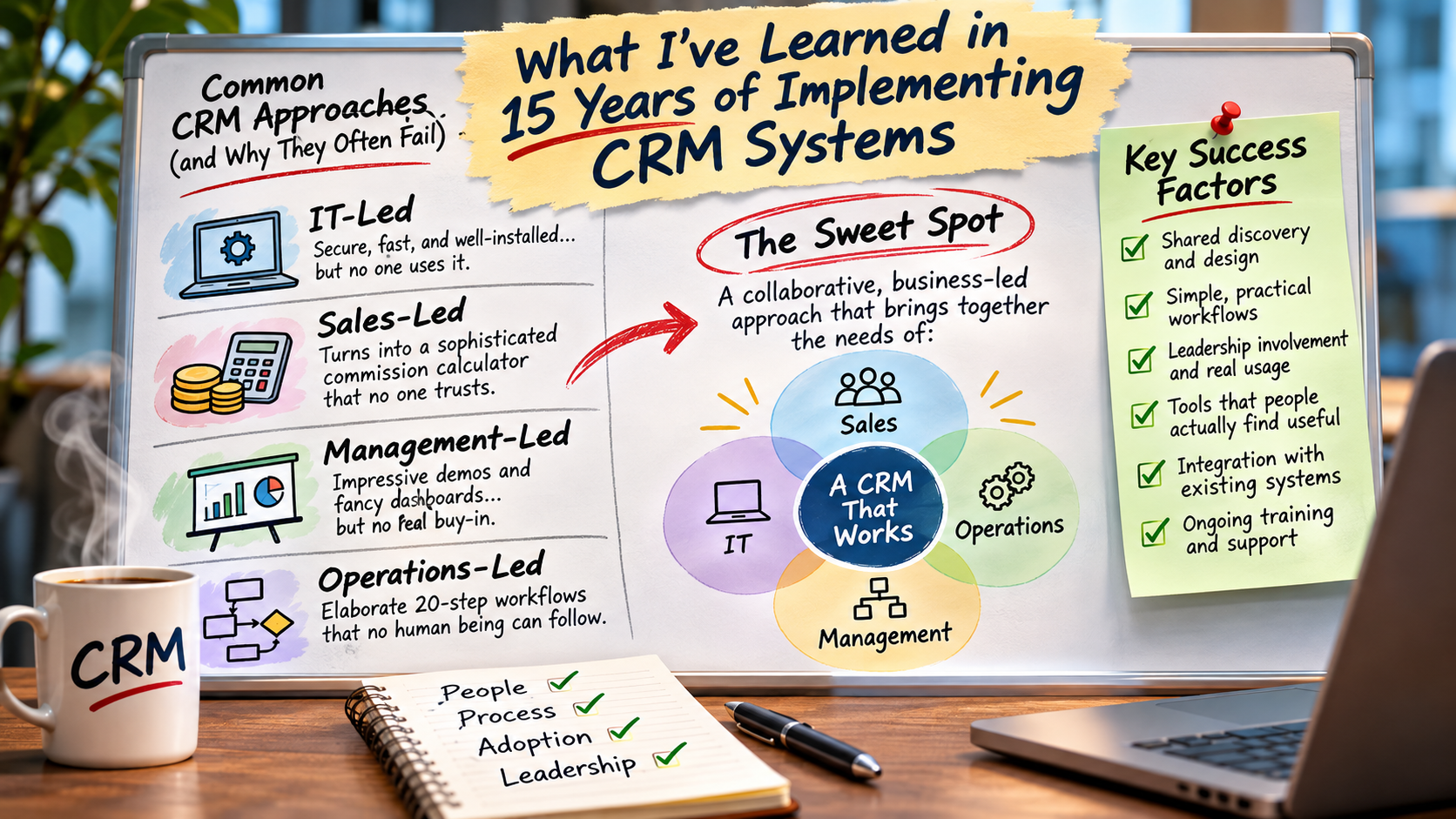
Over the years, I’ve encountered four common approaches to CRM implementation. Each has its strengths, but when one department’s priorities dominate the project, things have a habit of going sideways.
The IT-Led CRM Implementation
This is one I’ve encountered more than a few times.
IT is given responsibility for implementing a CRM system, and they do what IT departments are trained to do. They select the technology, configure the server, establish permissions, implement security policies, and integrate authentication with the organization’s existing systems.
Everything is secure. Single sign-on works beautifully. Performance is excellent. The application is installed, configured, tested, and ready for business.
IT announces, “The CRM is ready!”
There’s just one small problem. Nobody has spent much time finding out what the people who will actually use the CRM need it to do.
Salespeople log in and discover that the information they’re looking for isn’t readily available. Their workflows don’t match the system. Simple activities require too many steps, and nobody has explained how the application is supposed to make their jobs easier.
Training, if it happens at all, is often an afterthought.
Frequently, this is when I get called in. The company has a CRM that nobody is using, and someone decides the problem must be a lack of training.
I start delivering training and quickly discover that the users have a long list of perfectly reasonable requirements that were never considered during implementation.
When those requirements make their way back to IT, the project suddenly looks considerably larger than anticipated. In some cases, the solution becomes moving to a commercial SaaS product that supposedly handles everything.
The original implementation gets abandoned, and the cycle starts again.
None of this means IT did a bad job. Security, performance, reliability, and authentication are essential. But installing a CRM system and implementing a CRM business process are two very different things.
The lesson: A technically successful installation is not necessarily a successful CRM implementation. IT needs to be involved from the beginning, but the project cannot be treated as an IT installation.
The Sales-Led CRM Implementation
This one can be particularly entertaining.
Sales gets control of the CRM project, and before long, the system begins evolving into the world’s most sophisticated commission calculator.
Every sales scenario gets its own calculation. Different commission rates for different products, customer types, territories, salespeople, and revenue arrangements. Special rules for particular accounts and exceptions for just about everything imaginable.
Then Accounting gets involved.
What happens when a customer doesn’t pay? What happens when a payment arrives three months late? Does the commission belong in the month the deal was signed, the invoice was issued, or the payment was received? What happens when the customer is billed in US dollars but the salesperson is paid in Canadian dollars? What about credits, partial payments, and adjustments?
Suddenly, the CRM is trying to reproduce an enormous amount of complicated accounting logic.
And inevitably, the numbers don’t match.
Sales argues that Accounting has calculated the commissions incorrectly. Accounting insists the CRM doesn’t understand how the transactions actually work. IT gets blamed for building the system incorrectly, and everyone spends far too much time arguing about numbers.
Meanwhile, the fundamental purpose of the CRM has been largely forgotten.
Pipeline visibility is poor, opportunities aren’t consistently maintained, sales activities aren’t properly recorded, and management still doesn’t have a reliable picture of what’s happening.
The salespeople continue managing their customer relationships through Outlook folders, personal spreadsheets, and their own individual systems.
To be clear, commissions are important, and salespeople absolutely deserve accurate information about their compensation. But complicated commission accounting generally belongs in the financial systems responsible for the underlying transactions. The CRM can display that information without becoming a competing accounting system.
The lesson: A CRM should make it easier for salespeople to sell while providing management with meaningful visibility and accountability. It shouldn’t become an alternative financial system that nobody trusts.
The Management-Led CRM Implementation
Here’s another familiar scenario.
Senior management attends a presentation from a major CRM vendor. The sales presentation is spectacular.
Beautiful dashboards, colourful charts, sales forecasts, performance metrics, artificial intelligence, predictive analytics, and just about every conceivable KPI are displayed on enormous screens.
The executives are impressed. This is exactly what they’ve been looking for!
The contract gets signed, and the project gets handed to the organization with instructions to “make it happen.”
Unfortunately, nobody has spent much time talking to the employees who will actually be responsible for keeping all those beautiful dashboards populated with information.
The sales team sees the new CRM as another administrative burden. They already have ways of managing their customers, opportunities, and activities, and the new system doesn’t seem to offer them much in return for the additional work.
So they continue working the way they always have.
Management eventually discovers that those magnificent dashboards are only as accurate as the information people enter.
If nobody updates their opportunities, records their activities, or maintains their pipeline, the company ends up with very sophisticated reports containing completely unreliable information.
Management gets frustrated, starts demanding updates, and employees begin treating the CRM as a reporting obligation rather than a useful business tool.
Eventually, someone concludes that the software must be the problem.
Time to buy another CRM!
The irony is that management’s objectives were perfectly reasonable. Every organization needs visibility into sales performance, forecasting, and activity. The mistake was designing the system primarily around the information management wanted to receive, rather than the value employees needed to receive from using it.
The lesson: You cannot buy accurate management reporting if the people responsible for the underlying information have no compelling reason to maintain it.
The Operations-Led CRM Implementation
I have a great deal of respect for Operations people. They understand processes, consistency, documentation, and accountability.
Unfortunately, sometimes they understand those things a little too well.
I’ve seen CRM workflows that resemble an industrial assembly line, with 15 or 20 carefully defined stages and elaborate rules governing how a record progresses from one stage to the next.
Every possible scenario has been considered. Every exception has a process. Every process has a corresponding status, and every status has its own set of rules.
On paper, it’s beautiful.
In practice, it’s almost impossible for a normal human being to follow.
Salespeople don’t work in perfectly predictable sequences. A prospect might skip several steps, change direction halfway through a conversation, disappear for six months, or suddenly be ready to purchase.
I much prefer designing workflows around a handful of meaningful stages or what I call “big buckets.”
Take a new lead, for example. We all understand what a New lead is, and we generally know what needs to happen next. There may be all kinds of nuances associated with that lead, but do we really need eight different stages to describe the variations of being new?
The more complicated the workflow, the more effort employees must spend maintaining the system instead of doing their jobs.
Eventually, people stop moving records through the prescribed stages. The workflow breaks down, the information becomes unreliable, and management loses the visibility the system was supposed to provide.
Operations was trying to create consistency and accountability, which are both worthwhile objectives. But the process became so elaborate that it defeated its own purpose.
The lesson: A simple process that everyone consistently follows is far more valuable than a sophisticated process that nobody can maintain.
The Warning Signs That Your CRM Isn’t Working
Beyond these four implementation approaches, I’ve learned to recognize a few warning signs that tell me a CRM isn’t delivering the value it should.
Some are obvious. Others are remarkably subtle.
“Can I Download This to Excel?”
Whenever I hear this question during CRM training, my ears perk up.
There’s absolutely nothing wrong with exporting information to Excel or CSV. Sometimes you genuinely need to share data with another system or perform specialized analysis.
But when people routinely export CRM information so they can organize it, filter it, maintain their own reports, or manage their daily work, I start asking questions.
Why can’t they do those things in the CRM?
Often, it’s because the information isn’t presented in a way that’s useful to them, or the reporting tools don’t support how they actually work.
Now we have two systems: the official CRM and the collection of personal spreadsheets that people actually use.
Worse, those spreadsheets quickly become more useful to their owners than the CRM itself. Employees become reluctant to abandon them, and the CRM becomes increasingly irrelevant.
A frequent need to export information can be a symptom that the CRM isn’t meeting its users’ needs.
The Elaborately Colour-Coded Outlook Inbox
You know the one.
Dozens of customer folders, colour-coded categories, flags, reminders, and elaborate rules for organizing incoming messages.
Every customer has a folder. Important opportunities are flagged. Follow-ups are buried somewhere in the inbox, and the salesperson knows exactly where everything is.
In effect, they’ve built their own personal CRM inside Outlook.
And the remarkable thing is that some of these systems work quite well for the individual.
The problem is that nobody else knows what’s going on.
If the salesperson goes on vacation, changes responsibilities, or leaves the organization, much of that relationship knowledge becomes difficult to access.
This is why I consider email integration one of the most important CRM capabilities. We shouldn’t expect employees to abandon Outlook, but we need to make their email activity part of a shared customer-management process.
The objective is to have the CRM drive the workflow, with email integrated into it, rather than have an elaborate inbox drive the workflow while the CRM sits largely unused.
“I Update the CRM Every Friday Afternoon”
This is almost always a bad sign.
It usually means the salesperson manages their actual business somewhere else during the week, then spends Friday afternoon copying information into the CRM because management expects it.
The CRM isn’t helping them do their jobs. It’s an administrative reporting obligation.
That creates duplicate work, delays the availability of information, and increases the likelihood of incomplete or inaccurate records.
Ideally, employees should capture information naturally as part of their daily activities. Management reporting should be a byproduct of that activity, not the reason employees are forced to enter it.
The Manager’s Spreadsheet Is More Accurate Than the CRM
I’ve seen this more often than I’d like.
The organization has invested in a CRM specifically to improve pipeline visibility, yet the sales manager maintains a separate spreadsheet because the CRM data can’t be trusted.
During sales meetings, everyone discusses the spreadsheet instead of the opportunities recorded in the CRM.
At that point, you have to wonder why the organization invested in a CRM at all.
If management doesn’t trust the system, employees will quickly recognize that maintaining it isn’t particularly important.
Nobody Agrees on What the Sales Stages Mean
Ask three salespeople what qualifies an opportunity as being in the proposal, negotiation, or committed stage.
If you get three completely different answers, your pipeline reports probably aren’t very meaningful.
This isn’t necessarily a software problem. It’s a process-definition problem.
Adding another ten stages won’t solve it. Clear definitions, reasonable expectations, and consistent usage will.
The CRM Has Everything, but Nobody Can Find Anything
Some CRM systems have an incredible amount of functionality. They can do almost anything, provided you know which module, menu, tab, subpanel, or configuration screen to visit.
That’s not necessarily useful.
Employees shouldn’t need an instruction manual to perform routine activities.
The information people need most frequently should be immediately accessible. More detailed capabilities can remain available without dominating the everyday interface.
Sometimes the best customization isn’t adding another feature. It’s removing unnecessary complexity.
Leadership Doesn’t Attend Training
This is one of my biggest warning signs, and frankly, one that drives me crazy.
I arrive to deliver CRM training, and the people who approved the project, funded it, and insisted the organization adopt the new system are nowhere to be found.
What message does that send to employees?
Apparently, using the CRM is important for everyone except the people running the company.
But there’s something even worse than leadership not attending training.
Leadership doesn’t use the CRM.
I’ve seen organizations spend enormous amounts of money implementing CRM systems, only to have sales managers continue running their meetings from separate spreadsheets or asking employees to email pipeline updates before the weekly meeting.
If management isn’t using the CRM to run the business, why should employees spend time keeping it accurate?
Every sales pipeline meeting should be driven by CRM information. Customer service meetings should use the cases, customer interactions, and activities recorded in the system. When management wants an opportunity update, the first place they should look is the CRM.
This doesn’t mean every piece of operational or financial information must physically reside in the CRM. Those records may properly belong in other business systems. But the CRM should provide a trusted, shared view of the customer and sales information people need to make decisions.
If something is wrong during a meeting, correct it in the system. If information is missing, establish who is responsible for maintaining it. Make the CRM the normal place where customer-facing work is reviewed and managed.
Leadership participation sends a powerful message that the system matters. Leadership ignoring the system sends an equally powerful message that it doesn’t.
CRM adoption isn’t something management can simply delegate. Leadership has to demonstrate its importance by using the system themselves.
So What’s the Secret to a Successful CRM Implementation?
After 15 years, I’ve come to believe that the most successful CRM projects aren’t really IT projects, Sales projects, Management projects, or Operations projects.
They’re business projects.
Every department has legitimate needs, and someone has to bring those perspectives together, a project manager.
IT needs to ensure the system is secure, reliable, and maintainable. Sales needs tools that make selling easier. Management needs reliable information and accountability. Operations needs processes that are consistent without being unnecessarily complicated.
The challenge is finding the right balance.
This is where I believe experienced CRM consulting and a proper discovery process make an enormous difference.
Before deciding which software to buy or what functionality to develop, spend time understanding how people actually work. Sit down with Sales, Management, Operations, IT, and Customer Service. Ask employees to demonstrate their current processes, including the spreadsheets and Outlook folders they’ve developed to work around existing limitations.
Then help each group understand the needs of the others.
Salespeople need to understand why visibility and accountability matter. Management needs to understand that users must receive genuine value from the system if they’re expected to maintain its information. Operations needs to recognize when a process is becoming too complicated, and IT needs to understand that successfully deploying the application is only one part of implementing it.
That doesn’t mean everybody gets every feature they request. In fact, a good discovery process often involves explaining why certain requests aren’t necessary or why there’s a simpler way to accomplish the same objective.
The goal is to design a system that works for the organization as a whole.
My Principles for Designing CRM Systems Today
My thinking about CRM design has evolved considerably over the years, particularly as new technologies have become available.
There are several principles I now try to follow.
Keep It Simple and Visual
I’m a big fan of Kanban boards. In my own CRM, I increasingly manage opportunities, tasks, and projects visually rather than constantly opening individual records or scrolling through lists.
A Kanban board quickly tells me what’s new, what’s progressing, and what needs attention. Moving something to another stage is simple and intuitive.

That doesn’t mean traditional record and list views should disappear. Sometimes I need to examine the details of a quote, review a contact record, or filter hundreds of transactions.
The key is to make the most common activities convenient while preserving access to the detail when it’s needed.
Design for the People Actually Using It
Salespeople are busy, and many spend considerable time away from their desks.
A CRM needs to work well on mobile devices and make it easy to record a meeting, update an opportunity, create a follow-up, or retrieve customer information.
Every unnecessary click, complicated form, or duplicated entry increases the likelihood that employees will stop maintaining the system.
If we want accurate information, we need to make contributing that information as effortless as possible.
Integrate Existing Business Systems
Many organizations already have enormous amounts of valuable customer information in financial systems, operational databases, email platforms, and other business applications.
Recreating that information in a CRM introduces additional administrative work and opportunities for discrepancies.
Where practical, I’d rather integrate with existing systems and make that information available where employees need it.
A salesperson shouldn’t have to access three different applications just to understand what’s happening with a customer.
Build Security and Training Into the Project
Security can’t be an afterthought. Neither can employee training.
A successful implementation needs appropriate authentication, permissions, auditing, and long-term maintenance. It also needs users who understand how the system works and why they’re expected to use it.
Training should include leadership, not just frontline employees. It should also continue as business processes evolve and new employees join the organization.
Make the CRM Useful to Management Every Day
A CRM should be the place management goes to understand the sales pipeline, customer relationships, activities, and outstanding issues.
That means incorporating CRM information into regular management meetings, not simply generating reports once a month.
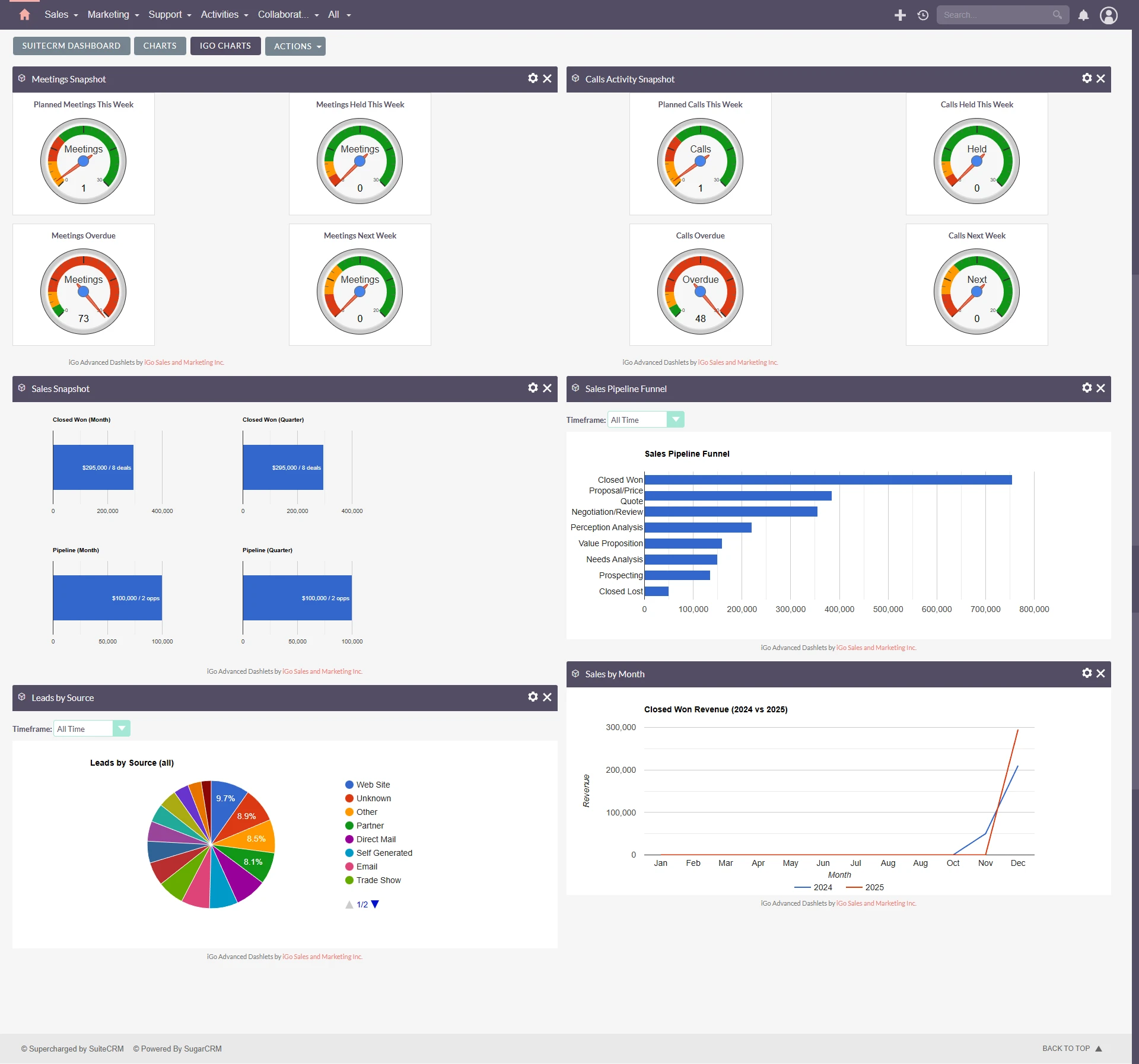
And importantly, the CRM should have an ongoing business owner who takes responsibility for processes, adoption, data quality, and continuous improvement.
A CRM is never really finished. It needs to evolve alongside the business.
And Now There’s AI
One of the most exciting developments in CRM technology is the opportunity to use artificial intelligence to make interacting with business information considerably easier.
I’ve been experimenting with an AI Chief of Staff that can retrieve information from my CRM, help plan my work, and identify activities requiring attention.
The next step is allowing it to create and update records through controlled, permission-based actions.
Imagine telling your CRM:
“Create an opportunity for this customer, schedule a follow-up for next Thursday, and add the notes from our meeting.”
The AI could prepare the records, confirm the details, and save the information without requiring the user to navigate multiple screens.
Or imagine asking:
“Which opportunities haven’t had any activity in the past two weeks?”
Instead of building a report, selecting filters, and searching through records, you simply ask the question and get an answer.
I don’t believe conversational AI should replace the conventional CRM interface entirely. Sometimes a visual Kanban board is the most convenient way to work. Sometimes a traditional record view is exactly what you need.
But AI can become another way of interacting with the same business information, particularly when the task involves retrieving information, summarizing activities, or completing routine administrative work.
I also think AI-assisted development will make it possible to customize CRM systems much more extensively and economically than was practical in the past.
However, we still need to get the underlying business processes right.
AI won’t magically solve poor adoption, unreliable data, or workflows that make no sense to the people using them. It might simply help us create those problems faster!
The Real Measure of CRM Success
As I prepare for this next CRM project, I’m reminded that the most important decisions probably won’t be about programming languages, databases, or which software platform we choose.
Those decisions matter, of course, but they’re not where successful CRM implementations begin.
They begin with understanding the people, their work, and the information they need to make better decisions.
They require Sales, Management, Operations, and IT to recognize that everyone’s requirements matter, even when those requirements compete.
They require leadership that doesn’t just approve the project but actively participates in making it successful.
And perhaps most importantly, they require a system that employees actually find useful.
Because after 15 years of implementing CRM systems, one lesson stands above all the others:
The best CRM isn’t the one with the most features, the most impressive dashboards, or the latest AI capabilities. It’s the one employees actually use, management trusts, and the organization relies on to run its business.
And getting there starts with listening, not installing software.
Thinking About Implementing or Improving Your CRM?
At iGo Sales and Marketing, we help organizations with CRM discovery, implementation, customization, integration, training, and ongoing improvement based on over 15 years of SuiteCRM Consulting (even before it was SuiteCRM and was SugarCRM!).
Whether you’re considering a new CRM, struggling with user adoption, or trying to get more value from an existing system, we can help you develop a solution that works for your business and the people who use it.
Let’s talk about your CRM project.
Need help implementing or improving SuiteCRM?
I provide SuiteCRM consulting, customization, implementation, and support services to help businesses get more value from their CRM.