
If you’ve worked with SuiteCRM 8, you’ve probably hit this realization:
“There has to be a better way to extend this without touching Angular.”
Good news — there is.
In this tutorial, I’ll show you how to turn SuiteCRM into an AI-powered sales assistant using a simple but powerful pattern:
Record Action → Webhook → AI → Update CRM → TimelineNo Angular. No frontend complexity. Just clean backend logic and automation.
🚀 What We Built
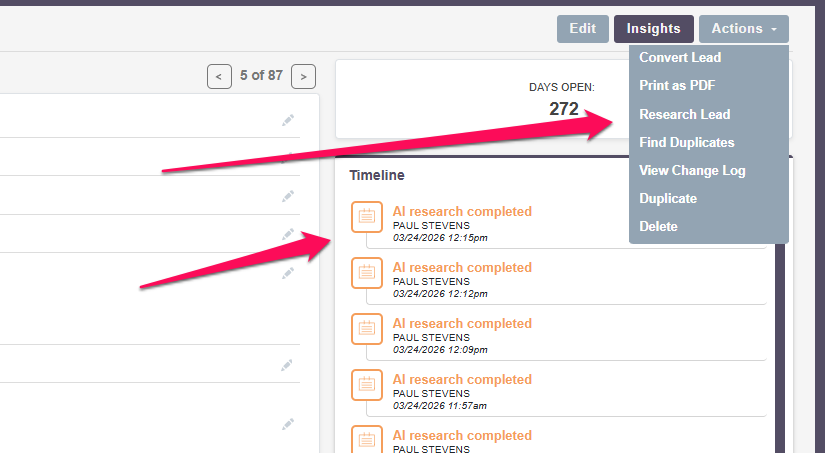
We added a “Research Lead” button to the Leads module that:
- Sends lead data to a webhook (n8n)
- Runs AI-powered research using web search
- Updates the lead with a summary
- Adds a timeline entry: “AI research completed”
- Reloads the record automatically
From the user’s perspective:
Click button → wait a few seconds → insights appear
🧠 The Architecture
Here’s the full flow:
SuiteCRM Record Action
        ↓
Process Handler (PHP)
        ↓
Webhook (n8n)
        ↓
Search API (Brave)
        ↓
AI Summary
        ↓
PATCH SuiteCRM (API)
        ↓
Add Note (Timeline)
        ↓
Reload Record
This pattern turns SuiteCRM into a trigger layer for external intelligence.
🧩 Step 1: Add a Custom Record Action
We register a new action using SuiteCRM 8’s extension system:
extensions/iGoTools/config/modules/Leads/recordview/actions/research-lead.phpThis makes the button appear in the Actions menu.
No Angular required.
<?php

namespace Symfony\Component\DependencyInjection\Loader\Configurator;

use Symfony\Component\DependencyInjection\ContainerBuilder;

return static function (ContainerBuilder $container): void {
    $actions = $container->getParameter('module.recordview.actions') ?? [];
    $modules = $actions['modules'] ?? [];
    $leads = $modules['leads'] ?? [];
    $recordActions = $leads['actions'] ?? [];

    $recordActions['lead-research'] = [
        'key' => 'lead-research',
        'labelKey' => 'LBL_RESEARCH_LEAD',
        'asyncProcess' => true,
        'modes' => ['detail'],
        'acl' => ['edit'],
        'params' => [
            'process' => 'record-lead-research',
        ],
    ];

    $leads['actions'] = $recordActions;
    $modules['leads'] = $leads;
    $actions['modules'] = $modules;

    $container->setParameter('module.recordview.actions', $actions);
};
⚙️ Step 2: Create a Process Handler
The handler:
- receives the Lead ID
- loads the bean
- builds a payload
- sends it to a webhook
extensions/iGoTools/modules/Leads/recordview/actions/LeadResearchAction.phpKey idea:
SuiteCRM does NOT do the AI work — it delegates it.
<?php

namespace App\Extension\iGoTools\modules\Leads\Process\Service\RecordActions;

use ApiPlatform\Core\Exception\InvalidArgumentException;
use App\Engine\LegacyHandler\LegacyHandler;
use App\Process\Entity\Process;
use App\Process\Service\ProcessHandlerInterface;

class LeadResearchAction extends LegacyHandler implements ProcessHandlerInterface
{
    protected const MSG_OPTIONS_NOT_FOUND = 'Process options is not defined';
    protected const PROCESS_TYPE = 'record-lead-research';

    public function getProcessType(): string
    {
        return self::PROCESS_TYPE;
    }

    public function getHandlerKey(): string
    {
        return $this->getProcessType();
    }

    public function requiredAuthRole(): string
    {
        return 'ROLE_USER';
    }

    public function getRequiredACLs(Process $process): array
    {
        $options = $process->getOptions();
        $module = $options['module'] ?? '';
        $id = $options['id'] ?? '';

        return [
            $module => [
                [
                    'action' => 'edit',
                    'record' => $id,
                ],
            ],
        ];
    }

    public function configure(Process $process): void
    {
        $process->setId(self::PROCESS_TYPE);
        $process->setAsync(false);
    }

    public function validate(Process $process): void
    {
        if (empty($process->getOptions())) {
            throw new InvalidArgumentException(self::MSG_OPTIONS_NOT_FOUND);
        }

        $options = $process->getOptions();
        $baseModule = $options['module'] ?? '';
        $id = $options['id'] ?? '';

        if (empty($id) || $baseModule !== 'leads') {
            throw new InvalidArgumentException(self::MSG_OPTIONS_NOT_FOUND);
        }
    }

	public function run(Process $process)
	{
		$this->init();

		$options = $process->getOptions();
		$id = $options['id'] ?? '';

		if (empty($id)) {
			$process->setStatus('error');
			$process->setMessages(['No Lead ID found']);
			$this->close();
			return;
		}

		$bean = \BeanFactory::getBean('Leads', $id);

		if (empty($bean) || empty($bean->id)) {
			$process->setStatus('error');
			$process->setMessages(['Lead not found']);
			$this->close();
			return;
		}

		$payload = [
			'id' => $bean->id,
			'first_name' => $bean->first_name,
			'last_name' => $bean->last_name,
			'account_name' => $bean->account_name,
			'email' => $bean->email1,
			'phone' => $bean->phone_work,
			'industry' => $bean->industry,
			'lead_source' => $bean->lead_source,
			'refered_by' => $bean->refered_by,
			'assigned_user_id' => $bean->assigned_user_id,
			'ai_summary_c' => $bean->ai_summary_c,
		];

		$jsonData = json_encode($payload);

		$ch = curl_init('https://n8n.igosalesandmarketing.com/webhook/YOURN8NENDPOINT');
		curl_setopt($ch, CURLOPT_CUSTOMREQUEST, 'POST');
		curl_setopt($ch, CURLOPT_POSTFIELDS, $jsonData);
		curl_setopt($ch, CURLOPT_RETURNTRANSFER, true);
		curl_setopt($ch, CURLOPT_TIMEOUT, 20);
		curl_setopt($ch, CURLOPT_HTTPHEADER, [
			'Content-Type: application/json',
			'Content-Length: ' . strlen($jsonData),
			'X-IGO-SECRET: YOURSECRETKEY',

		]);

		$response = curl_exec($ch);
		$httpCode = curl_getinfo($ch, CURLINFO_HTTP_CODE);
		$curlError = curl_error($ch);
		curl_close($ch);

		if ($httpCode !== 200) {
			$process->setStatus('error');
			$process->setMessages([
				'Research Lead webhook failed. HTTP ' . $httpCode . ($curlError ? ' | ' . $curlError : '')
			]);
			$this->close();
			return;
		}

		global $current_user;

		$leadId = $id; // use your known process id, not $bean->id unless $bean is definitely in scope

		$note = \BeanFactory::newBean('Notes');

		if ($note) {
			$note->name = 'AI research completed';
			$note->description = 'AI research completed successfully via record action.';
			$note->parent_type = 'Leads';
			$note->parent_id = $leadId;
			$note->assigned_user_id = $current_user->id ?? '';
			$note->created_by = $current_user->id ?? '';
			$note->modified_user_id = $current_user->id ?? '';
			$note->save();
		}

		$process->setStatus('success');
		$process->setMessages(['Research Lead triggered successfully']);
		$process->setData([
			'reload' => true,
		]);

		$this->close();
	}
}
🌐 Step 3: Call an External Webhook (n8n)
We send a POST request with lead data to:
https://your-n8n-endpointThis is where the magic happens:
- search
- AI processing
- CRM updates
SuiteCRM just triggers it.
🔍 Step 4: Replace Google Search (Important Lesson)
Originally, we used Google Custom Search.
It failed.
Why?
- restricted API access
- inconsistent behavior
- not future-proof
✅ Solution: Brave Search API
We switched to Brave using a simple HTTP request:
GET https://api.search.brave.com/res/v1/web/searchWith headers:
X-Subscription-Token: YOUR_API_KEY
Accept: application/json
💡 Key Insight
Don’t rely on native nodes.
Use the HTTP Request node for full control and predictable results.
🤖 Step 5: AI Summarization
The AI receives:
- Lead info
- Search results
And returns:
- Company background
- Role insights
- Recent news
- Sales positioning advice
Important Lesson
We initially used an AI agent with tools.
It caused:
- timeouts
- inconsistent results
- unreliable behavior
✅ Better Approach
Search first → AI summarizesNot:
AI decides how to search🔐 Step 6: Secure the Webhook
Since this triggers paid APIs, we added protection:
Shared Secret Header
SuiteCRM sends:
X-IGO-SECRET: your-secretn8n validates it before running.
This prevents:
- unauthorized access
- unexpected API costs
🕒 Step 7: Add Timeline Visibility
After success, we create a Note:
AI research completedThis appears in the Lead’s timeline.
Why this matters:
- users trust visible feedback
- provides audit trail
- zero frontend work required
💡 Why This Approach Works
We avoided:
- Angular development
- UI complexity
- fragile frontend logic
And used:
- backend process handlers
- external automation (n8n)
- clean API calls
🔥 Real-World Use Cases
This pattern is reusable for:
1. AI Follow-Up Emails
Generate personalized outreach instantly
2. Lead Scoring
Score leads based on real-world signals
3. Company Enrichment
Fill in missing data automatically
4. LinkedIn Lookup
Find profiles and context
5. Deal Coaching
Get AI suggestions on next steps
🎯 The Big Idea
You’re not just adding a button.
You’re turning SuiteCRM into:
An AI-powered automation platformWhere every record can trigger:
- intelligence
- enrichment
- decision support
🧠 Final Thoughts
SuiteCRM 8 can feel limiting at first.
But once you realize:
“I don’t need to build everything inside SuiteCRM”
Everything changes.
Let SuiteCRM:
- trigger actions
Let external tools:
- do the heavy lifting
📦 Video
- Video tutorial: (your YouTube link)
🚀 What’s Next
In future tutorials, I’ll cover:
- building reusable AI action frameworks
- advanced enrichment workflows
- integrating with LinkedIn + email systems
💬 If you found this useful
Let me know — or better yet, try it yourself.
This is one of those patterns that once you see it…
You start using it everywhere.
Need help with SuiteCRM development?
I provide custom SuiteCRM development, customization, integrations, and technical support for businesses that need expert help.